
Step By Step Installation and Setup
Upon initial discovery, the Drupal Custom Permissions Module may seem like an obscure module. However, it is the sort of module that once needed it provides enormous convenience. The Drupal Custom Permissions Module makes it easy to add a role based permissions setting to any Drupal "route". One of many use cases for this module, is that it provides an easy to way to disable the Password Reset form and page, without having to resort to the effort of creating a specific custom module, so that anonymous Drupal 8 website visitors do not have access to it. The Drupal route for the Password Reset form is user.pass.
To install the Custom Permissions Module on a Drupal 8 website, first load the code onto the Drupal 8 site's server using the SSH command line composer utility. From the SSH command line, use the composer utility to add the module's code the website's server. The composer utility shell command via SSH is:
php composer.phar require drupal/config_perms
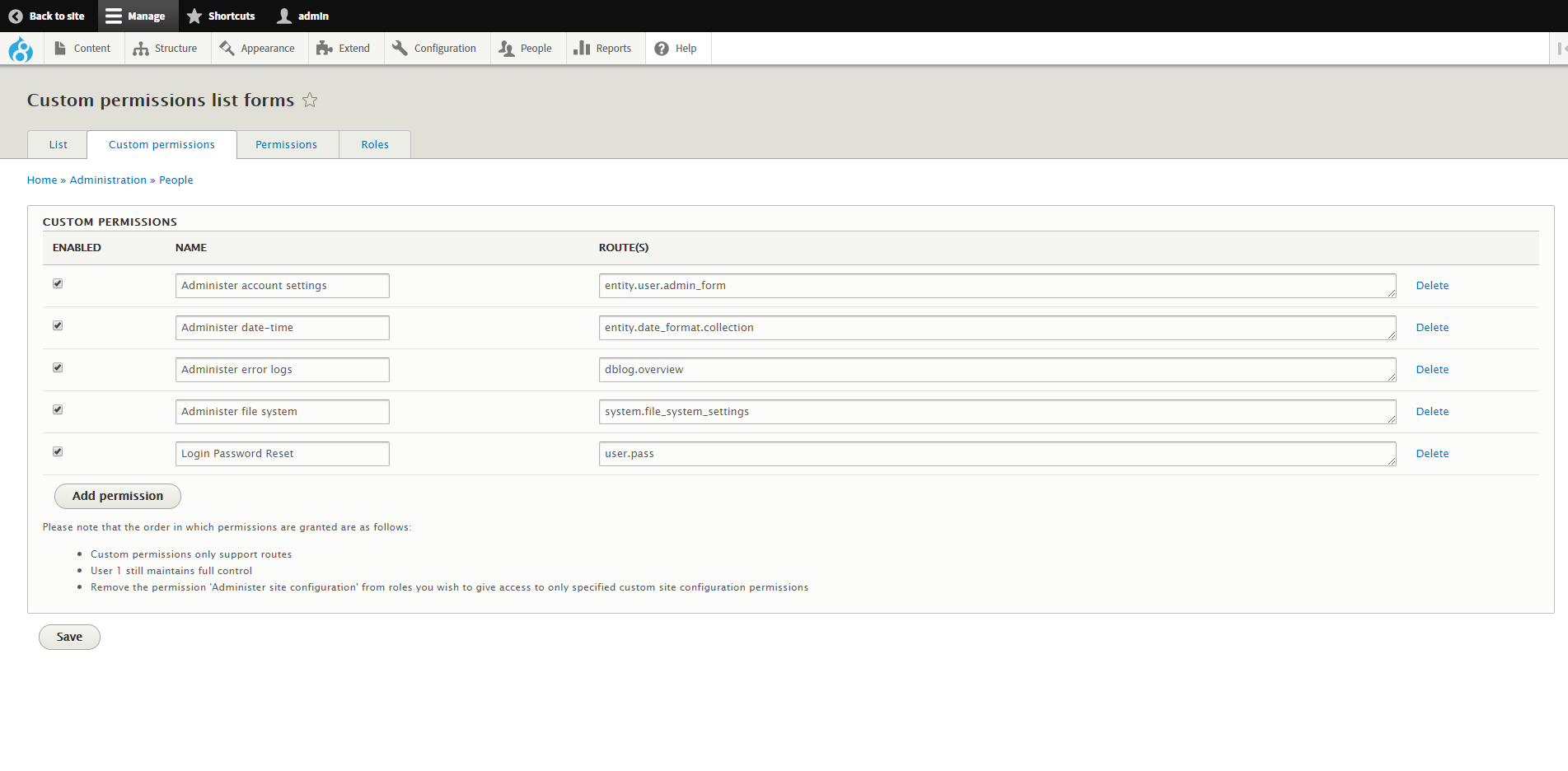
Next, enable the Custom Permissions module at the website's admin/modules admin GUI page. Then it is possible to add new custom permissions from the [custom permissions ] tab on the permissions page within the Drupal administration page. The second image above shows what this page looks like after a custom permission for the user.pass route had been added. Once the custom permission has been added, role based access for that route can be customized on the permissions page.